

How Do I Create a Live or Demo MT5 Account?
You can create either a live MT5 account through My IG or a demo account directly in the MT5 platform.
How Do I Add a Live MT5 Account?
To add a live MT5 account, you must first have access to My IG.
Step 1 – Access Your Account
Step 2 – Set Up MT5
|
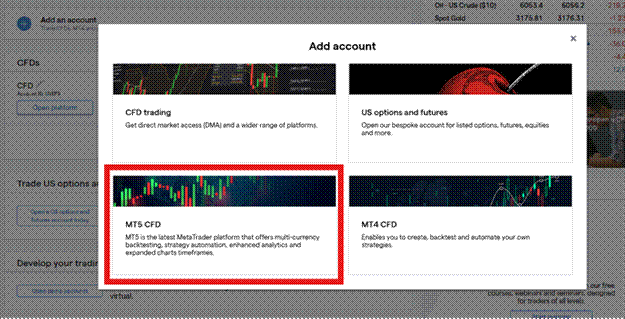
My IG dashboard — select 'Add another account'
UK account types: |
CFD accounts are available for clients who wish to trade contracts for difference. Spread Bet accounts are also available for UK clients and may have different tax treatment depending on your circumstances. You can hold both account types simultaneously. |
Once you complete these steps, you can begin trading on a live MT5 account whilst keeping all your chart data and analysis intact.
How Do I Create a Demo MT5 Account?
You can create the demo account directly within the MT5 platform itself. It is not possible to create a demo MT5 account through My IG.
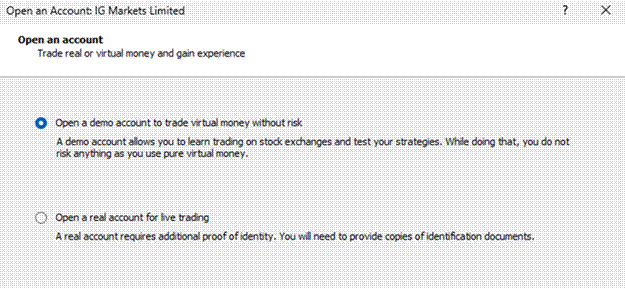
MT5 platform — File > Open an Account to create a demo
To set up a demo account:
|
Important Considerations for Demo Accounts
- Demo accounts expire after 60 consecutive days of inactivity.
- We cannot reset MT5 demo account passwords – you'll need to create a new account if you forget your password.
- Demo accounts don't match live markets exactly. They run in controlled environments and won't show the slippage you might experience in live trading.
Important: For live accounts, you'll receive a five or six-digit account number specifically for MT5, which differs from your standard IG account details. When logging into any platform version, live account users must select 'IG-Live' as the server or manually type the address: mt5.ig.com:443 |

