Spread bets and CFDs are complex instruments and come with a high risk of losing money rapidly due to leverage. 68% of retail investor accounts lose money when trading spread bets and CFDs with this provider. You should consider whether you understand how spread bets and CFDs work, and whether you can afford to take the high risk of losing your money.

IgNewLogo
Help and Support

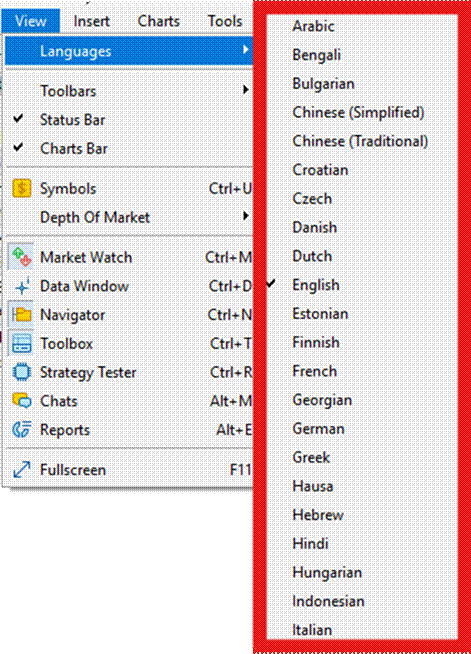
How to Change Language Settings in MT5?

MT5 provides comprehensive multilingual support with 39 available languages, allowing traders to use the platform in their preferred language.

How Do I Change MT5 Language?

Step 1 – Access Language Menu

  1. Open MT5
  2. Click 'View' menu (top left)
  3. Select 'Languages'


Step 2 – Select Language

  1. Choose your preferred language
  2. Restart the MT5 terminal


Title: MT5 View menu showing Languages option - Description: MT5 View menu showing Languages option

MT5 — View > Languages


Important: You must restart MT5 before the new language displays. This ensures all platform elements properly display in the newly selected language.


Need Help with Language Settings?

If you're having trouble changing your MT5 language settings, contact us via live chat or WhatsApp.


Are you finding this article useful?

Positive FeedbackNegative Feedback

Related articles

How to Use the Chart Window in MetaTrader 4

How to Use Trading Signals on MT5?

How to View Your MT5 Trade History and Generate Reports?