Spread bets and CFDs are complex instruments and come with a high risk of losing money rapidly due to leverage. 68% of retail investor accounts lose money when trading spread bets and CFDs with this provider. You should consider whether you understand how spread bets and CFDs work, and whether you can afford to take the high risk of losing your money.

IgNewLogo
Help and Support

How to Use Trading Signals on MT5?

MT5 integrates comprehensive trading signals functionality that enables automatic copying of professional traders' strategies through the platform's built-in social trading features.

What Are MT5 Trading Signals?

Trading signals enable automatic trade copying from professional traders directly to your account. When a signal provider places a trade, the same trade is executed on your account in real time.


How Does It Work?

A trader makes their trading activity publicly available, and other users can subscribe to their signal. Once subscribed, all trades executed by the provider are automatically mirrored on the subscriber's account.


How Do I Find Signals?

Step 1 – Access Signals

  1. Open MT5
  2. Click 'Signals' tab in platform


Step 2 – Browse Signals

  1. View thousands of free and paid signals
  2. Check provider statistics and performance
  3. Review trading history and results


Title: MT5 Signals tab location in the platform - Description: MT5 Signals tab location in the platform

MT5 — Signals tab

Title: MT5 Signals list showing provider performance ratings - Description: MT5 Signals list showing provider performance ratings

Signals list — providers sorted by performance rating


How Do I Subscribe to Signals?

Step 1 – Select Signal

  1. Choose your preferred signal provider
  2. Review their terms and costs


Step 2 – Subscribe

  1. Click subscribe button
  2. Confirm subscription details
  3. Complete payment if required


Step 3 – Start Copying

  1. All provider trades now copy to your account automatically
  2. Monitor performance in your account history


What Quality Controls Exist?

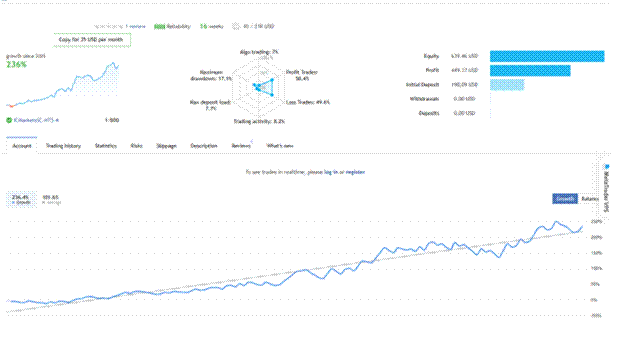
Title: MT5 signal provider performance chart showing growth over time - Description: MT5 signal provider performance chart showing growth over time

Signal provider analytics — growth chart and trading history

MetaQuotes implements rigorous screening procedures to maintain signal quality standards. If a provider's results over the previous month are not satisfactory, the signal will not be featured in the showcase. Only the top 1,000 rated signals are displayed on the platform; the full list is available on the MQL5.community website.


Important Considerations:


  • Risk Management: Ensure that the lot sizes selected are appropriate for your account balance and risk tolerance.

  • Performance Monitoring: Regularly review the performance of your chosen signal provider to ensure it aligns with your trading goals.

  • Flexible Subscriptions: You can cancel your signal subscription at any time.


Are you finding this article useful?

Positive FeedbackNegative Feedback

Related articles

Can I Use MT5 on a Mobile?

How to Access VPS on MT5?

How to Use the Terminal Window in MetaTrader 4